Implementing Best Practices in Laravel Development
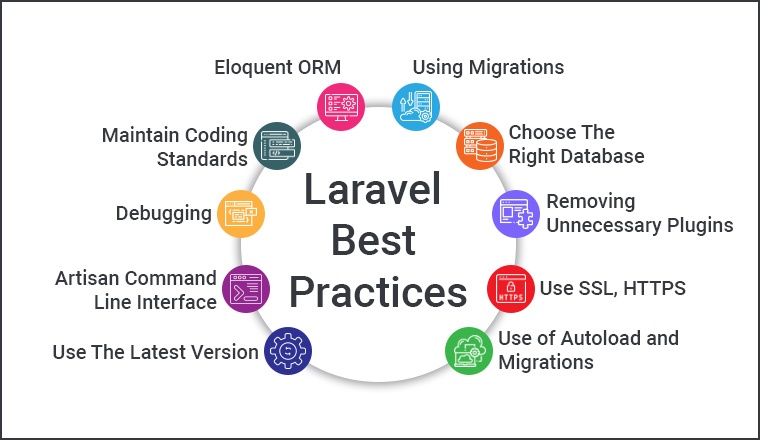
Laravel is a powerful PHP framework that provides a robust set of tools and an elegant syntax for building web applications. To ensure that your Laravel applications are scalable, maintainable, and secure, it's crucial to follow Laravel best practices throughout the development process. This blog will guide you through implementing these best practices, covering everything from setting up your environment to deploying and maintaining your application.
Setting Up Your Laravel Environment
Setting up your Laravel environment correctly is the first step towards a successful project. Ensure your system meets the necessary requirements, including PHP, Composer, and a suitable database management system. Using tools like Homestead or Docker can create a consistent development environment, minimizing "it works on my machine" issues.
System Requirements
PHP version 7.3 or higher
Composer for dependency management
A database management system like MySQL, PostgreSQL, SQLite, or SQL Server
Installation and Configuration
Install Laravel via Composer:
bash
Copy code
composer create-project --prefer-dist laravel/laravel myproject
- Configure your .env file for database connections and other environment-specific settings.
Using Homestead or Docker
Homestead and Docker provide isolated development environments, making it easier to manage dependencies and configurations.
Code Organization and Structure
A well-organized codebase is essential for maintainability and scalability. Laravel follows the MVC (Model-View-Controller) architecture, which separates application logic, UI, and data handling.
MVC Architecture
Models: Manage data and business logic.
Views: Handle the presentation layer.
Controllers: Interact with models and render views.
Directory Structure
Understanding Laravel’s directory structure helps in maintaining a clean and organized codebase:
app/: Contains the core code of the application.
resources/: Houses views, raw assets, and language files.
routes/: Defines all the routes for the application.
Namespacing and Autoloading
Use proper namespacing to avoid class name collisions and leverage Composer’s autoloading feature to manage dependencies.
Using Eloquent ORM Effectively
Eloquent ORM is one of Laravel’s standout features, offering a simple ActiveRecord implementation for working with databases.
Defining Models and Relationships
Define models for each database table and establish relationships using Eloquent methods like hasOne, hasMany, belongsTo, and belongsToMany.
Query Scopes and Accessors
Use query scopes to encapsulate commonly used queries and accessors/mutators to format attributes before they are saved or retrieved.
Eloquent Collections and Mutators
Eloquent collections provide a fluent, convenient wrapper for working with arrays of models. Mutators allow you to alter data before it’s saved to the database.
Database Migrations and Seeding
Database migrations and seeding ensure your database schema is up-to-date and populated with sample data for development and testing.
Creating and Running Migrations
Generate migration files using Artisan commands:
php artisan make:migration create_users_table
Run migrations to apply changes to the database:
php artisan migrate
Database Seeding for Development and Testing
Seed your database with sample data using Laravel’s seeder classes, enabling you to quickly populate tables with dummy data.
Managing Database Changes
Use version control for your migration files to track and manage database schema changes effectively.
Routing and Controllers
Laravel’s routing system is powerful and flexible, allowing you to define routes for your application and handle HTTP requests efficiently.
Defining Routes
Define routes in the routes/web.php or routes/api.php files, specifying the URL patterns and corresponding controller actions.
Resource Controllers
Resource controllers provide a convenient way to handle CRUD operations using a single controller class.
Route Model Binding
Use route model binding to automatically inject model instances into your routes based on route parameters.
Blade Templating Engine
Blade is Laravel’s simple yet powerful templating engine that helps you build dynamic views efficiently.
Template Inheritance
Use Blade’s template inheritance to create a base layout and extend it in other views, ensuring a consistent look and feel.
Displaying Data
Display data in your views using Blade’s convenient syntax for echoing variables and handling loops and conditionals.
Components and Slots
Leverage Blade components and slots to create reusable, modular pieces of UI that can be used across your application.
Validation and Form Handling
Proper validation and form handling are critical for ensuring data integrity and a seamless user experience.
Request Validation
Validate incoming data using Laravel’s built-in validation methods, either directly in controllers or using Form Request classes.
Handling Form Submissions
Process form submissions and handle validation errors gracefully, providing feedback to users.
Custom Validation Rules
Create custom validation rules to handle complex validation logic specific to your application.
Authentication and Authorization
Laravel provides robust authentication and authorization mechanisms to secure your application.
Built-in Authentication Features
Utilize Laravel’s built-in authentication scaffolding to quickly set up login, registration, and password reset functionality.
Role-Based Access Control
Implement role-based access control (RBAC) to manage permissions and restrict access to certain parts of your application.
Custom Guards and Providers
Define custom guards and user providers to tailor the authentication logic to your specific requirements.
Testing in Laravel
Testing is an integral part of Laravel development, ensuring your application works as expected and preventing regressions.
Unit Testing
Write unit tests to verify the functionality of individual components in isolation.
Feature Testing
Use feature tests to simulate user interactions and test the entire application workflow.
Mocking and Stubs
Leverage mocking and stubs to isolate your tests from external dependencies, making them more reliable and faster.
Error Handling and Logging
Effective error handling and logging help you diagnose issues and maintain a smooth user experience.
Custom Error Pages
Create custom error pages to provide user-friendly messages and maintain a consistent UI during errors.
Logging Configuration
Configure logging channels and log levels to capture relevant information about application events and errors.
Exception Handling
Customize exception handling to manage different types of exceptions and provide appropriate responses.
Performance Optimization
Optimizing your Laravel application ensures it performs well under load and provides a fast user experience.
Caching Strategies
Implement caching strategies to reduce database queries and speed up page load times.
Query Optimization
Optimize database queries by using indexes, avoiding N+1 queries, and leveraging Eloquent’s eager loading.
Optimizing Blade Templates
Minimize the processing time of Blade templates by using compiled views and avoiding heavy logic in views.
Security Best Practices
Following security best practices is crucial for protecting your Laravel application from common vulnerabilities.
Protecting Against SQL Injection
Use parameterized queries and Eloquent ORM to protect against SQL injection attacks.
Cross-Site Scripting (XSS) Prevention
Escape output in views to prevent XSS attacks, ensuring user input is safely rendered.
Cross-Site Request Forgery (CSRF) Protection
Laravel automatically includes CSRF tokens in forms, protecting against CSRF attacks.
Leveraging Laravel Packages
Laravel’s ecosystem includes a wealth of packages that can extend the framework’s functionality.
Popular Laravel Packages
Integrate popular Laravel packages like Spatie’s roles and permissions, Laravel Cashier for billing, and more.
Creating and Using Custom Packages
Create custom packages to encapsulate reusable code and share it across multiple Laravel projects.
Composer and Package Management
Use Composer to manage dependencies and keep your packages up to date.
Deployment and Maintenance
Deploying and maintaining your Laravel application involves several best practices to ensure smooth operation.
Deployment Strategies
Choose a deployment strategy that fits your workflow, such as continuous integration/continuous deployment (CI/CD) pipelines.
Environment Configuration
Use environment variables to manage configuration settings for different environments, keeping sensitive information secure.
Scheduling and Task Automation
Leverage Laravel’s task scheduling features to automate routine tasks and maintenance jobs.
Choosing the Right Laravel Web Development Services
Partnering with a reputable Laravel web development services provider can enhance your project’s success by providing expert guidance and support.
Experience and Expertise
Select a provider with extensive experience in Laravel development and a proven track record of successful projects.
Portfolio and Client References
Review the provider’s portfolio and client references to assess their capabilities and performance.
Support and Maintenance Services
Ensure the provider offers ongoing support and maintenance services to address issues and keep your application running smoothly.
Scalability of Services
Choose a provider that can scale their services to meet your growing needs, from small projects to large enterprise applications.
Communication and Collaboration
Effective communication and collaboration are essential for a successful partnership with your Laravel web development services provider.
Conclusion
Implementing Laravel best practices ensures your web applications are secure, efficient, and maintainable. By following the guidelines and leveraging expert services, you can build high-quality Laravel applications that meet your business objectives


